How to organise a weekly pool service plan
For a business with two technicians, a full calendar does not always mean a well-organised day. The aim is a repeatable plan, fewer unnecessary journeys and a clear arrangement for covering each route when someone is absent.
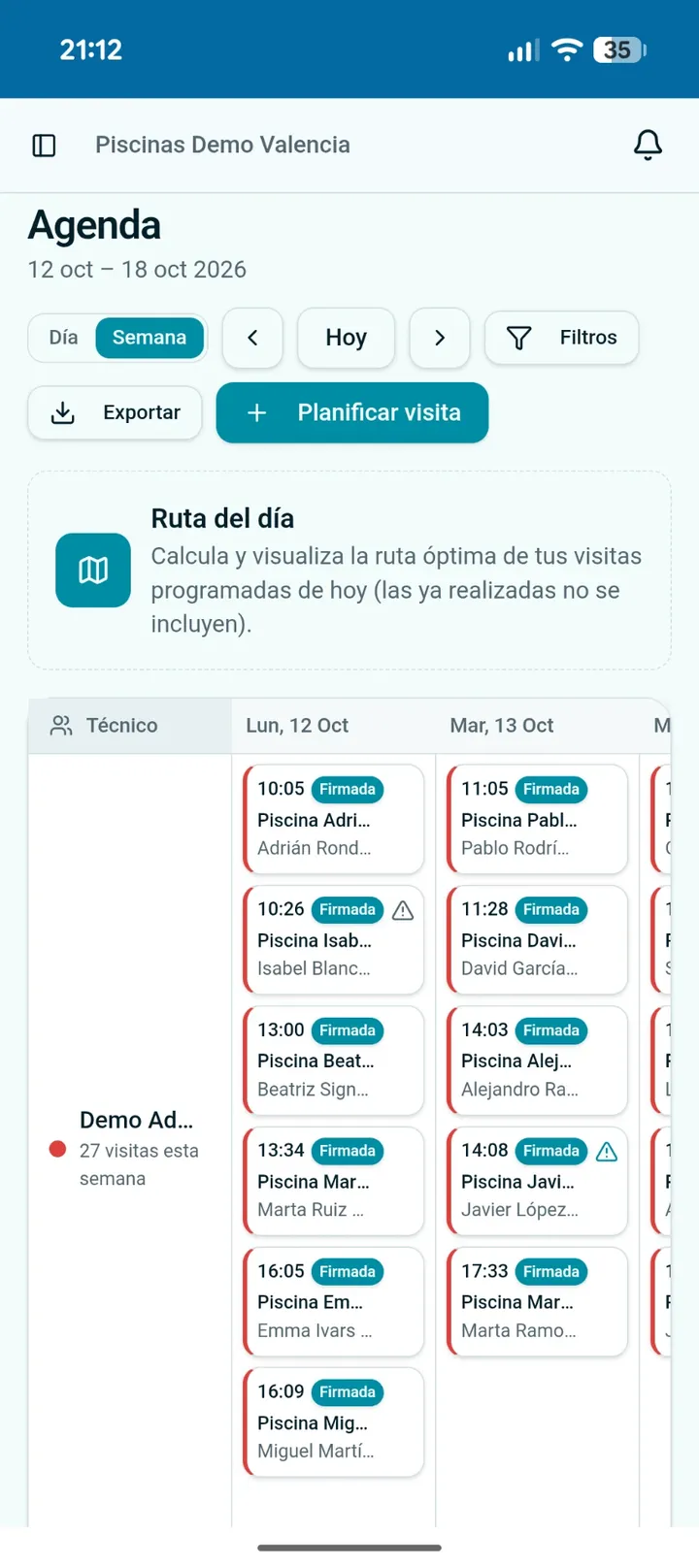
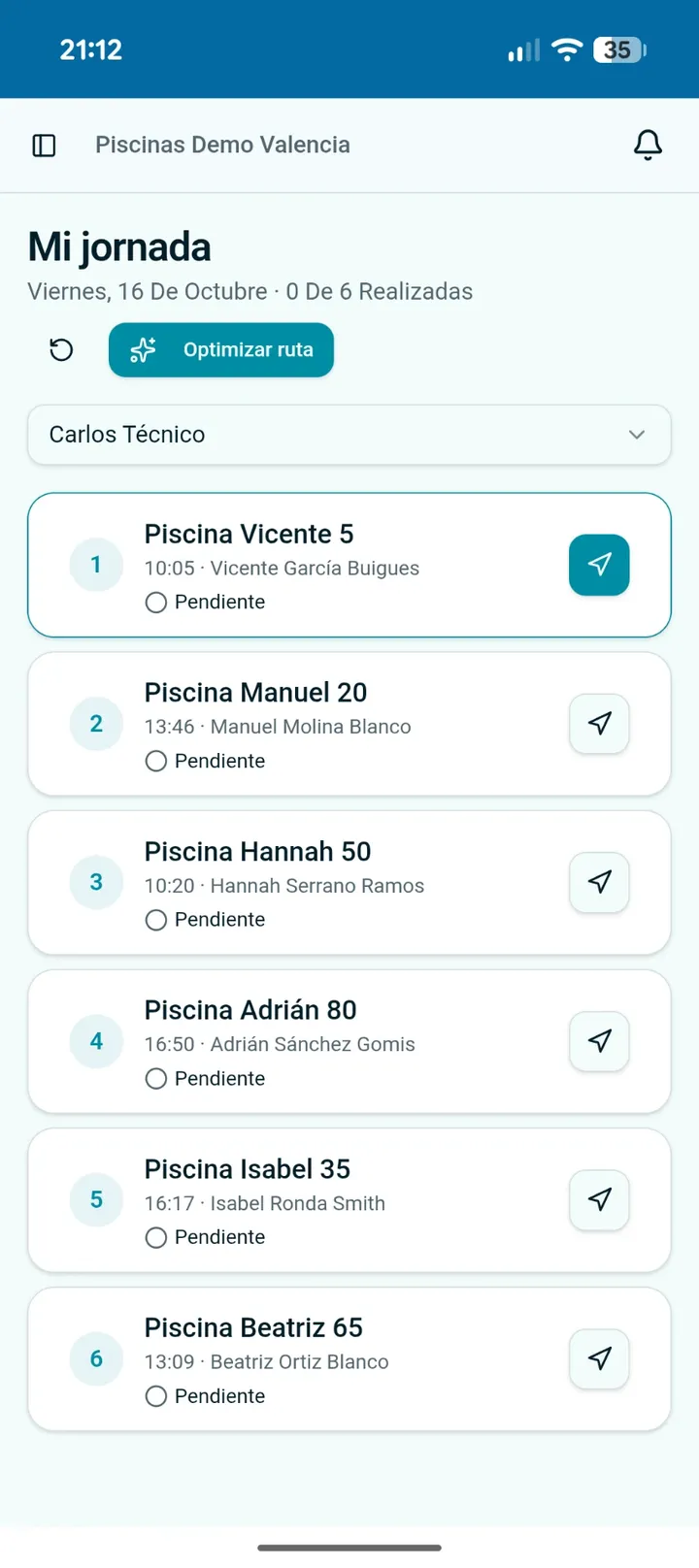
Start with your customer base, not the calendar
For each pool collect its address, agreed service days, zone, difficulty and usual technician. Record access arrangements, time restrictions and special tasks too: nearby sites do not necessarily require the same amount of work.
Frequency depends on the contract, usage, season and site needs. Do not apply one weekly visit to every pool or confuse your maintenance visits with checks the operator may need to perform between them.
Build a plan you can repeat
- 1
Group by practical zones
Use neighbourhoods, towns or sectors that make sense by road. Two pools close on a map can still be separated by a slow access route.
- 2
Set regular days and a lead technician
Keep continuity for the customer instead of rebuilding every Monday. If a pool needs two visits, space them according to its needs, not just spare slots.
- 3
Assign complex sites deliberately
Give community pools or demanding equipment to a suitably experienced technician. A new colleague can accompany them before taking the route alone.
- 4
Balance time, not just pool counts
Allow for servicing, travel, preparation and collecting supplies. Six complex pools can take longer than ten simple ones. Leave room for unexpected work.
Illustrative example: a manager and two technicians
An organisation example, not a capacity estimate or a recommended visit frequency.
Experienced technician · north zone
Groups nearby community pools and complex sites. Avoid adding an isolated southern stop just because their visit count looks lower.
Trainee technician · south zone
Maintains straightforward pools locally, with planned support for unfamiliar tasks. The manager reviews issues and redistributes work when needed.
Absences: separate temporary cover from permanent changes
Before an absence, review pending visits in the period and distribute them between available people by zone, skills and workload. Share access instructions and the relevant history with substitutes; changing a calendar name is not enough.
Temporary cover should retain the usual technician for future weeks. A permanent move changes the recurring assignment too. Signed reports are not reassigned: they keep the identity of the person who performed and signed the work.
Check before confirming the week
Service and people
- Are agreed days and access restrictions respected?
- Does each complex site have suitable cover?
- Have substitutes confirmed availability and supplies?
Travel and spare capacity
- Are there avoidable zone crossings or overloaded days?
- Have you allowed for one-off jobs and incidents?
- Have you checked holidays and closures? Pool Service Hub does not exclude them automatically.
Improve the plan with actual results
At the end of the week compare actual service and travel time with your assumptions. If a community pool always overruns, review the service scope, allocation or price instead of filling more slots.
My day helps technicians follow their stops; the weekly plan decides who goes on which days. Ordering a route does not replace checking time restrictions, skills and availability. These decisions complement each other.
Put the method into practice with Pool Service Hub
- 1
Complete planning
For each pool set zone, usual days, difficulty and lead technician, or import them from your spreadsheet.
- 2
Generate the week
In Schedule tap Generate week, check the preview and create visits. Technicians are notified.
- 3
Handle the unexpected
For sick leave or holidays, share the work between substitutes by zone, level and workload.
Keep reading: Scheduling and weekly plan · Route profitability · Community pool maintenance
Frequently asked questions
Does generating twice duplicate visits?+
No. Any pool that already has a visit that day is skipped, so you can regenerate after adding pools.
What is the difference between 'just this once' and 'permanent'?+
'Just this once' moves unsigned visits in the chosen range. 'Permanent' also changes those pools' lead technician for future weeks.
Can I assign a less experienced technician?+
Yes. Level and zone warnings are advisory only.
Are public holidays excluded?+
Not yet. Check the preview and remove or move visits on non-working days.
Plan the season once. Generate each week in seconds.
No card · For solo operators and teams